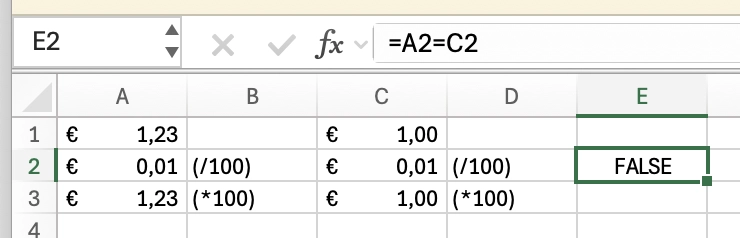
You know, they say never to use binary floating point to do financial calculations…but what they don't say is that Excel uses binary floating point to do financial calculations, and if your software's calculation results don't match the equivalent spreadsheet, people will think there's a bug in your software!
So uh, if you want people not to use binary floating point for financial calculations, you're gonna have to start with Microsoft.
@argv_minus_one but this rounding really is a problem everywhere. it's also really annoying with VAT and bookkeeping software
some invoices round the VAT total at the end, some of them round the VAT totals per type at the end then sum them, some round it per invoice line and then sum them
Yeah, I generally round for user input and display only, and use full precision for calculation and storage.
I used to round in intermediate calculations, back in the bad old days before I understood how binary floating point works, but this is a bad idea as it introduces rounding errors. This sort of intermediate rounding should only be done with decimal fixed/floating point (such as java.math.BigDecimal).
What exactly does that mean? Are you saying it does *= 100; round(); /= 100 on any value read from a cell with a currency-based number format?
Because Excel 2016 doesn't do that. I just tried. Full precision passes through currency-formatted cells.
Like, if you have… A1: =PI() A2: =A1 A3: =A2 …and A2 has a currency-based number format, then A2 will be rounded (“$3.14”) but A3 will have all same digits as A1.